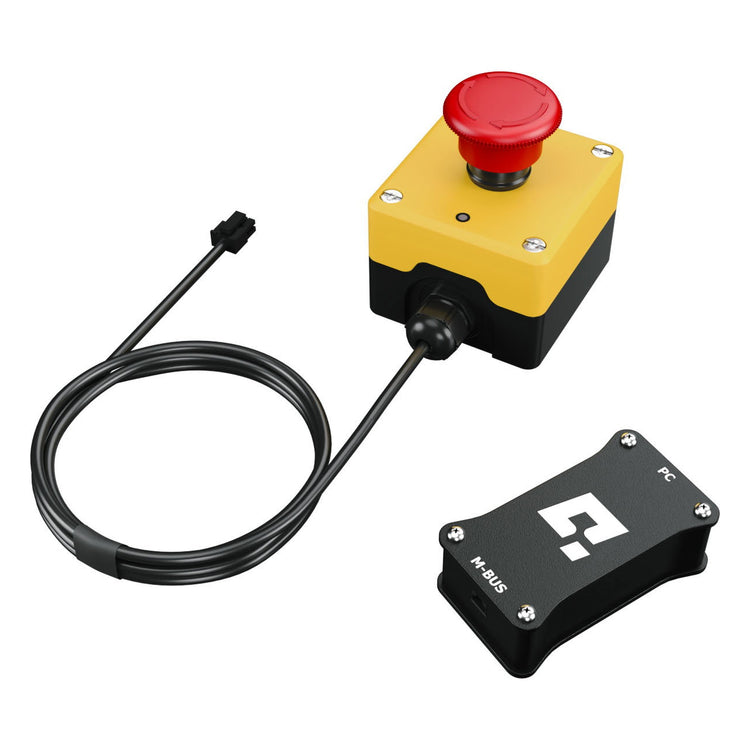

Qubic System QS-MC6 motion controller with Motion Lock switch and M10 interface module
Qubic System QS-MC6 set contents: Motion Lock switch, BUS cable, USB-C cable, BUS terminator and M10 module, view 2
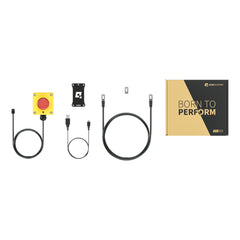
Qubic System QS-MC6 retail box, view 3
Qubic System QS-MC6 complete set with retail box, view 4

Qubic System QS-MC6 – Motion Controller

Vendor: Qubic System
SKU: QS-MC6
Availability: Out Of Stock
Product type: Simracing > Motion & haptique > Accessoires motion
Regular price
419,90€
Regular price
Sale price
419,90€

About VAT

Subtotal: 419,90€

Fast Shipping

Secured Payments

More than 10 Years of Expertise

Qubic System QS-MC6


The Qubic System QS-MC6 is the motion controller and Motion Lock set that links your PC to actuator-based Qubic System devices. Its M10 interface module talks to the power cabinets over Motion Systems’ own protocol for safe operation, quick response and stable, low-latency control, while the Motion Lock Switch lets you stop the platform at any moment. You need one QS-MC6 per simulator built on QS-210, QS-220 or QS-CH2. Designed and made in Poland (EU).

Key features

  • PC–QS communication: the M10 interface module is the main link between your PC and the actuator-based Qubic System devices.
  • Qubic System protocol: runs on Motion Systems’ own protocol for stable, low-latency control across the Qubic System ecosystem.
  • Motion Lock Switch included: a physical stop button for safe entry, exit and emergencies.
  • Complete set: BUS cable, USB-C cable and BUS terminator included to connect the M10 module to your PC and to the power cabinet.
  • One set per simulator: Qubic System specifies one QS-MC6 set per simulator.

Technical specifications

  • Reference: QS-MC6
  • Controller: M10 interface module (PC–QS communication device)
  • PC connection: USB-C cable
  • Device connection: BUS (RJ45–RJ45 cable), BUS terminator on the last power cabinet
  • Protocol: Motion Systems proprietary protocol
  • Safety: Motion Lock Switch
  • Software: Qubic Manager (PC)
  • Origin: made in Poland (EU)

In the box

  • M10 interface module (PC–QS communication device)
  • Motion Lock Switch
  • BUS communication cable (RJ45–RJ45)
  • USB-C cable (for PC connection)
  • BUS terminator (RJ45 plug with resistor)

Important notes

  • One QS-MC6 per simulator: if you combine several Qubic System devices on the same rig (for example QS-210 + QS-TP1), one set is enough.
  • Do not substitute the M10: it is designed for the Qubic System protocol; no other interface can replace it.
  • BUS terminator: it goes into the free BUS port of the last power cabinet in the chain.
  • Motion Lock: to build a working safety stop, all power cabinets in the circuit must be linked with Motion Lock interlink cables (not part of the QS-MC6 set).
  • PC only: the M10 module needs a free USB port on your PC.
  • Follow the Qubic System product manual for wiring and setup.

Compatibility

  • Qubic System QS-210, QS-220 and QS-CH2: QS-MC6 required, to be purchased separately; one set per simulator.
  • Qubic System QS-TP1 Traction Pro: QS-MC6 required if the QS-TP1 is your only Qubic System device. On an existing Qubic platform, the QS-TP1 joins its existing Motion Lock circuit.
  • Qubic System QS-V20, QS-S25 and QS-S35: QS-MC6 already included with the platform, no need to buy it separately.
  • Qubic System QS-BT1 and QS-H13: not needed, these devices communicate with the PC directly over USB.
  • Platform: PC with Qubic Manager.

Which model to choose

  • QS-MC6: the full controller set (M10 module + Motion Lock Switch + cables). Required to run QS-210, QS-220 or QS-CH2 actuators, or a standalone QS-TP1, from your PC.
  • Qubic System Motion-Lock Switch (QS-SBML-1): the stop button on its own. Choose it if your simulator already has a controller and you only want an extra stop button.

FAQ

Do I need a QS-MC6 for my Qubic System platform?

Yes for simulators built on QS-210, QS-220 or QS-CH2, and for a QS-TP1 used as your only Qubic System device. QS-V20, QS-S25 and QS-S35 already include it, and QS-BT1 and QS-H13 connect over USB without it.

How many QS-MC6 sets do I need?

One per simulator. If you add a QS-TP1 or other Qubic System devices to the same rig, they join the same circuit.

How does the QS-MC6 connect?

The M10 module connects to your PC with the USB-C cable and to the power cabinet with the RJ45 BUS cable. The BUS terminator goes into the last power cabinet in the chain.

What is the Motion Lock Switch for?

It locks the motion of the platform: you use it to get in and out safely, and to stop everything instantly if needed.

Who handles warranty and after-sales service?

The French Simracer handles after-sales service for the Qubic System QS-MC6, with a France-based contact. You benefit from the 2-year legal warranty, or the manufacturer warranty if longer.

Return & Refund Policy

In accordance with EU Directive 2011/83/EU and the French Consumer Code (Articles L221-18 et seq.), you have a 14-day right of withdrawal from the day you receive your order, without justification or penalty.

Eligibility

Any returned product must be intact, with no signs of wear, use, or installation, in its original packaging, and complete with all accessories, manuals, and the purchase invoice. Incomplete, damaged, dirty items, or products showing signs of use (e.g., sweat on wheels, assembly scratches, damaged threads, tightening marks) or with deteriorated packaging will not be refunded or exchanged.

How to Start a Return

Contact us first at contact@thefrenchsimracer.com. Items sent back without prior authorization cannot be accepted.

Return shipping is at the customer’s expense, unless the product is defective, damaged, or an error was made on our side.

Refund Options

  • Full store credit (100%) — voucher valid on any future purchase.
  • Refund to your original payment method — a case-by-case proportional deduction of 5% to 35% may apply, depending on the product’s condition (e.g., traces of use, assembly, missing packaging or accessories). This deduction reflects the objective depreciation of the item.

As per Article L221-23, any deduction must correspond to handling beyond what is necessary to establish the nature, characteristics, and proper functioning of the goods.

Damages & Issues

Please inspect your order upon delivery and contact us immediately if the item is defective, damaged, or incorrect. We will correct the issue at no cost to you.

Exceptions / Non-returnable Items

  • Custom or personalized products
  • Gift cards
  • Items that cannot be returned for health/hygiene reasons once unsealed

Note: Sale/discounted items remain eligible for the 14-day withdrawal unless otherwise stated on the product page or they fall under a legal exception above.

Exchanges

To exchange, simply return the product and place a new order once your return has been approved.

Processing & Timelines

You will be notified once we have received and inspected your return. After approval:

  • Store credit: issued immediately after approval.
  • Refund: processed within 10 business days. Bank/card processing may take longer. If you have not received funds after 15 business days, please contact us.

Outbound shipping: we refund the standard delivery cost you originally paid (if any). Express/premium surcharges are not refundable.

See our Terms of Sale here: /policies/terms-of-sale.

Related Products

Recently Viewed Products